




In this tutorial
Prepare your data
First step is to ensure that BigQuery is already configured as a source in DinMo, and Snapchat Ads has been added as a destination.
Ensure that you have already created the segments that you wish to sync to Snapchat Ads in DinMo. If not, go to the Segments tab, click "New Segment," and create them one by one with the appropriate rules.
Create your activation
Navigate to the Activations tab, and click "New Activation" in the upper-right corner of the screen.
Select the type of segment you wish to activate - either conversions (called events) or audiences (called users).
Select the segment you wish to sync to Snapchat Ads, and specify the appropriate Snapchat Ads option before clicking “Continue”.
Then, select Snapchat Ads from the platform dropdown and click “Continue”.

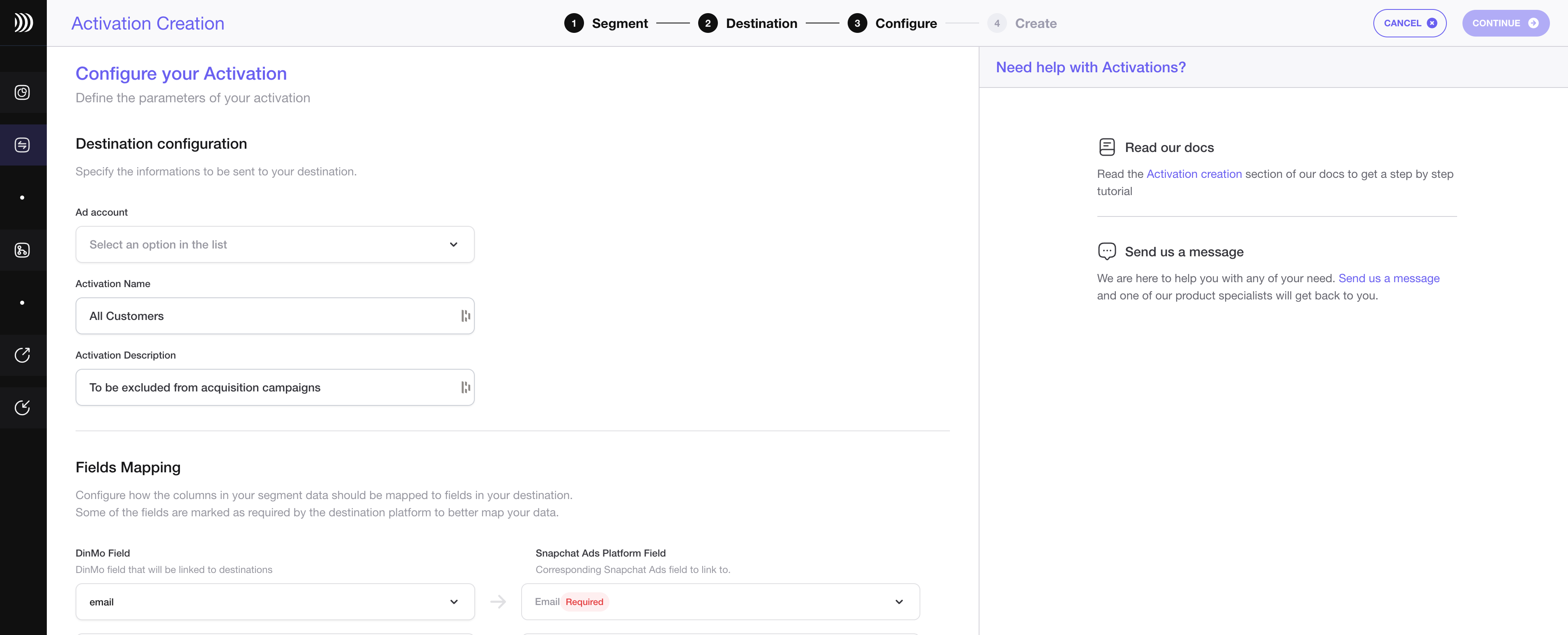
Configure the sync
Choose the ad account you wish to use.
If you want to change the activation name, fill in the corresponding field. You can also add a description to this activation.
Specify the external ID that should be used by Snapchat to identify your contacts.
To map the fields for user segments, specify which properties of your segment correspond to the mail address, phone number, first name, and last name.
Under the Scheduling options, choose the time interval for syncing your segments to Snapchat Ads. A daily sync is sufficient for most use cases.
Click "Continue," and then click "Create" to finish.
Once the activation is created, it should start syncing immediately. Wait a few moments to ensure that the sync is successful.
That's it! You have successfully synced your BigQuery data with Snapchat Ads in DinMo. If you face any issues, refer to DinMo's documentation or contact their support team for assistance.


