

How to send conversions to ChatGPT Ads
8min • Last updated on Sep 1, 2026


Alexandra Augusti
Chief of Staff
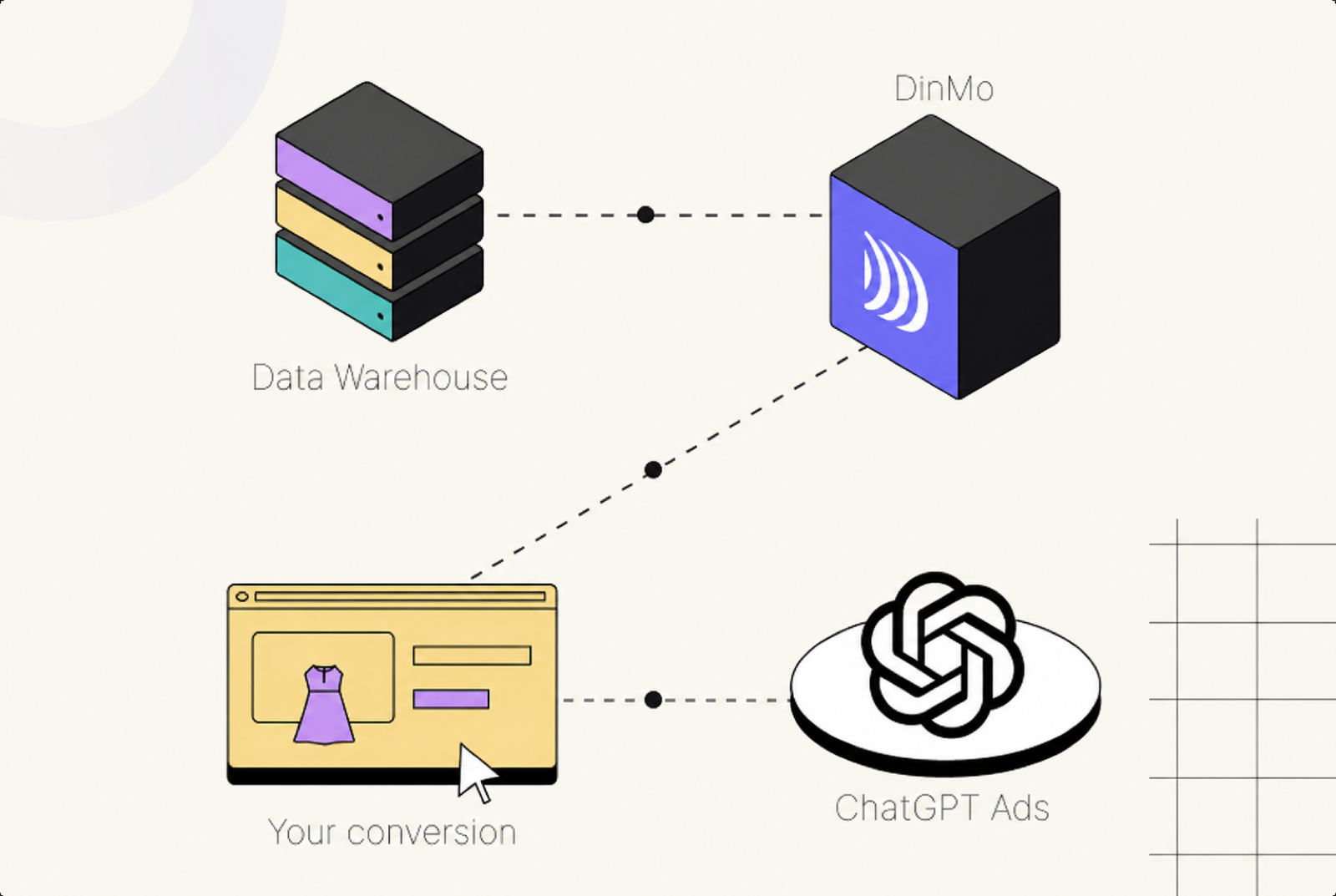
Conversion APIs let advertisers send events directly to advertising platforms instead of relying only on browser-side tracking. With DinMo’s ChatGPT Ads connector, you can now send online and offline conversions from your data warehouse to the OpenAI Conversions API.
Key takeaways
One platform connection links DinMo to one ChatGPT Ads conversion pixel using a Pixel ID, a Conversions API key and an Ads API key.
Each activation represents one event and one action source such as web, mobile app, offline, physical store, phone call, email or other.
DinMo supports compatible standard events and active custom events that are already linked to the pixel in ChatGPT Ads Manager.
Every source row must represent one conversion with a stable Event ID and an event time from the last seven days.
DinMo normalises and hashes key personal identifiers before delivery, while you remain responsible for consent and data governance.
What is the ChatGPT Ads Conversions API?
The ChatGPT Ads Conversions API is a server-side interface that receives conversion events from an advertiser’s systems. It complements browser signals and can capture outcomes that happen later in the journey, including an in-store purchase, a qualified CRM lead, a confirmed appointment, a trial start or a new subscription.
The principle is similar to Meta Conversions API and Google Ads Enhanced Conversions: the advertiser provides reliable first-party events to strengthen measurement and give the advertising platform better optimisation signals.
The ChatGPT Ads connector is available in private preview. Contact us if you want to test it on your own!
Why send conversions to ChatGPT Ads?
An ad click does not show whether an opportunity ultimately created value. The journey between the first interaction and the final outcome may include an AI assistant, a website, an app, a CRM, a call centre or a shop. When those signals remain isolated, the platform sees only part of the campaign result.
A server-side workflow centralises events in the data warehouse and sends them according to a controlled definition. It helps measure online and offline conversions, represent lower-funnel outcomes and reduce dependence on browser tracking. It is part of a first-party server-side tracking strategy.

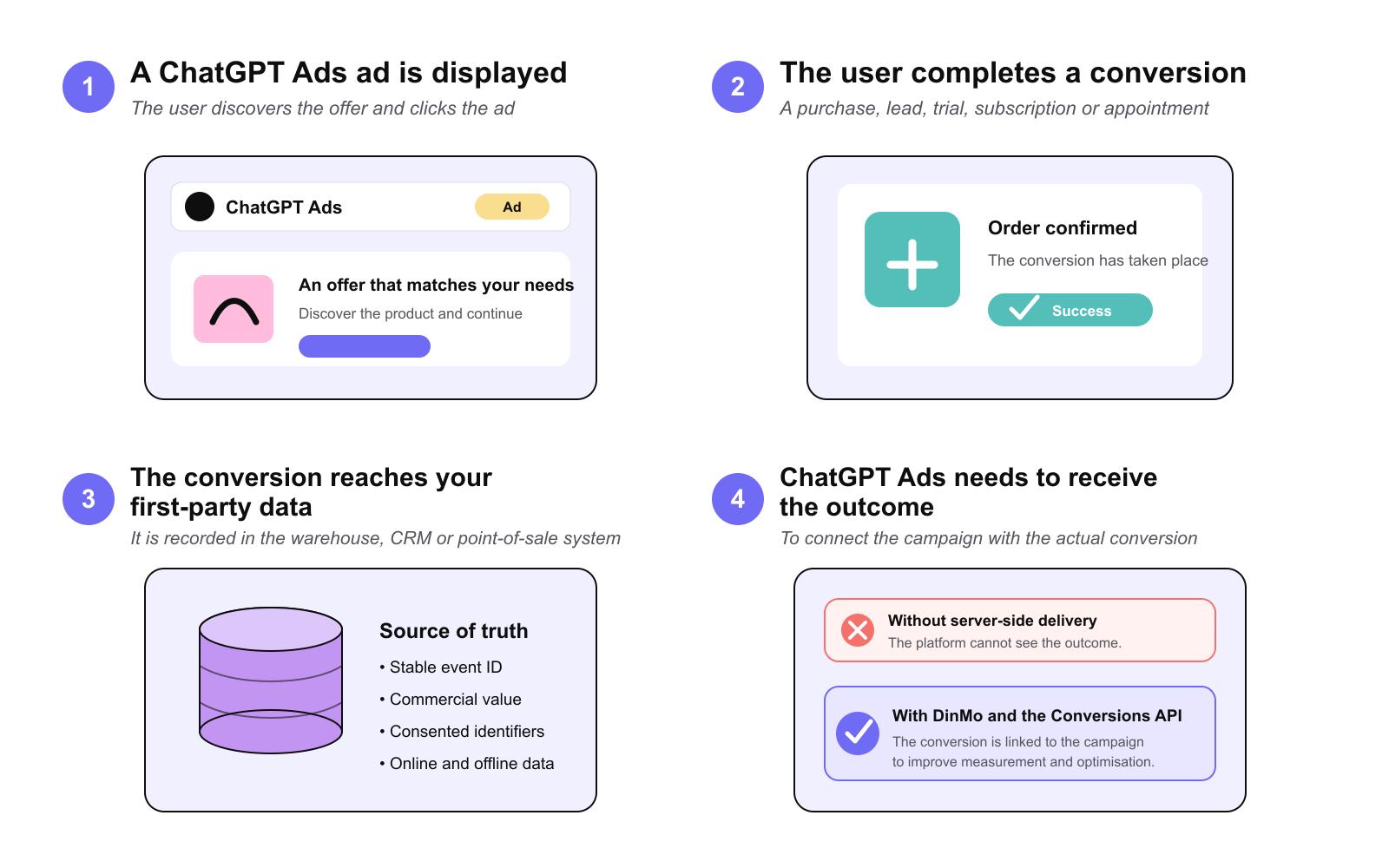
Why send conversions to ChatGPT Ads
Which events should you send to ChatGPT Ads?
The right question is not how many events you can send. It is which signals genuinely represent the value created by your campaigns. A page view, a checkout start, a sales appointment and a subscription do not tell the same story.
As a prospect moves through the funnel, their intent increases. Events that sit closer to revenue therefore give ChatGPT Ads a more useful view of performance than clicks or visits alone.
Match events to your funnel
ChatGPT Ads supports standard events across several stages of the customer journey. Depending on your business, these can include:
Discovery: important pages and content views.
Engagement: new leads, scheduled appointments and completed registrations.
Intent: items added and checkouts started.
Conversion: orders, trials and subscriptions created.
App lifecycle: app installations and openings.

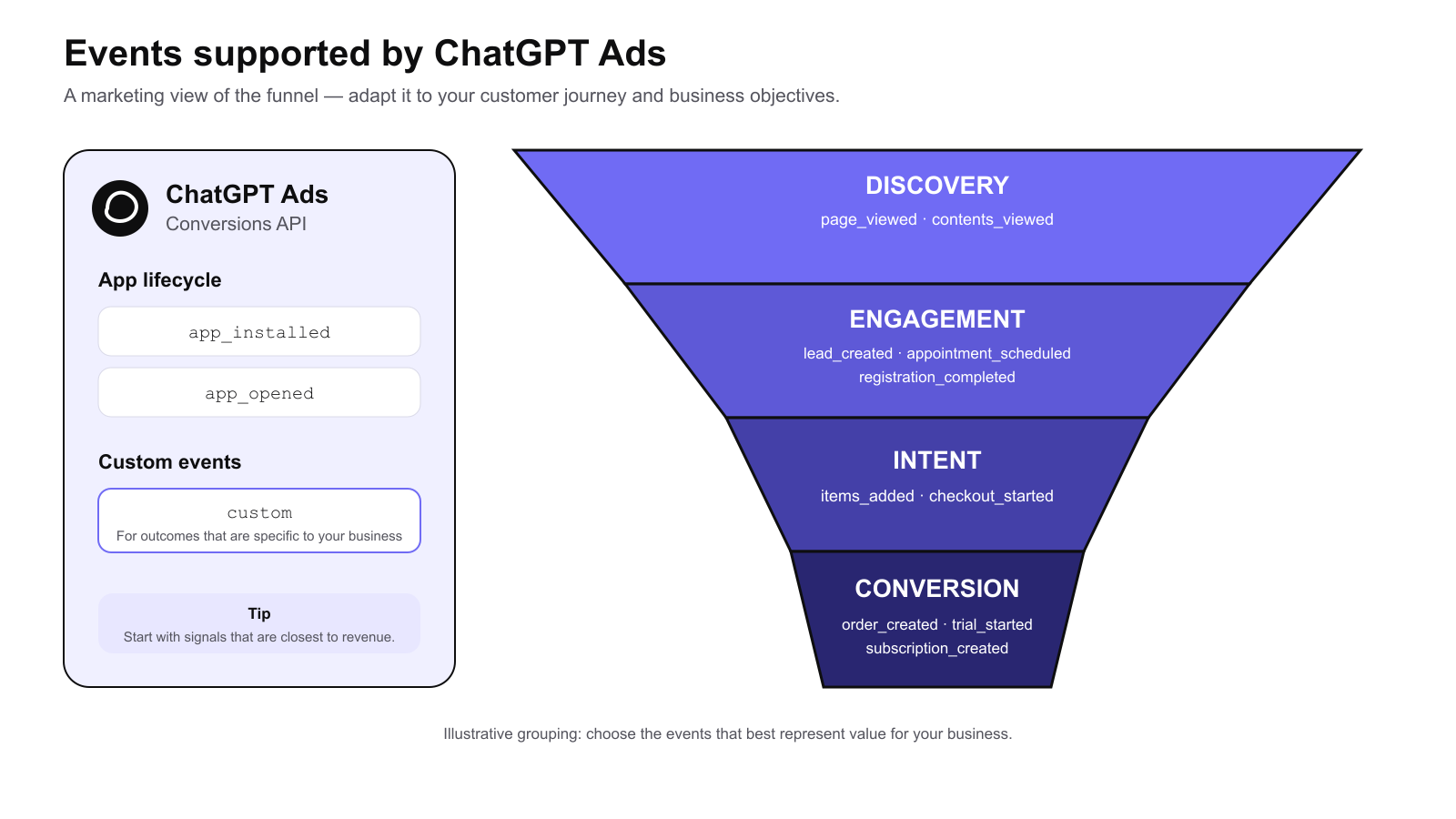
Events supported by ChatGPT Ads
This grouping is an illustrative marketing view: the right event depends on your business model and campaign objective. ChatGPT Ads also accepts custom events for outcomes that are specific to your organisation. See the complete list and definitions in DinMo’s ChatGPT Ads documentation.
Prioritise signals that represent value
Consider a B2B company that currently optimises campaigns around lead creation. If only a small share of those leads becomes a booked appointment or a qualified opportunity, form volume is not the best indicator. By sending a scheduled appointment event or a custom qualified-lead event, the marketing team can align advertising optimisation more closely with commercial reality.
The same logic applies to ecommerce and subscription businesses. A completed order is closer to revenue than a product view; a new subscription is more meaningful than a simple registration. Start with the events that best represent your business objective, then enrich the funnel progressively.
Three practical use cases to start with
Ecommerce: move from visits to completed orders
A retailer can reconstruct the main stages of the journey through content views, items added, checkouts started and orders created. The objective is not to send every available interaction. It is to place greater emphasis on the moments that demonstrate strong intent and measurable commercial value.
When the data warehouse also contains the order amount, product category or actual transaction status, the marketing team gains a view that is closer to its business reporting. It can distinguish campaigns that generate traffic from those that genuinely produce sales.
B2B: distinguish a lead from a genuine opportunity
In a long sales cycle, a submitted form is often only the beginning. Lead creation, scheduled appointments and event registrations can be measured separately. A custom event can also represent a business-specific milestone such as a qualified lead or a completed product demonstration.
This level of detail helps marketing and sales work towards the same outcome. Campaigns are no longer assessed only by cost per form submission, but by their ability to move prospects towards a commercially useful interaction.

Nexity uses Conversions APIs to improve leads quality
SaaS and apps: measure adoption, then monetisation
For a subscription product, an app installation or opening can represent initial activation, while a trial start and a new subscription indicate stronger intent and value. These events make it possible to separate the acquisition of a user from their progression towards becoming a paying customer.
The right scope depends on the revenue model. A team might begin with subscriptions created, then add trial starts or a custom product milestone once those definitions are stable enough to support a marketing decision.
How to activate a ChatGPT Ads conversion strategy with DinMo
With DinMo, the objective is not to build an API project. It is to turn data that already exists across your organisation into reliable marketing signals and activate them in ChatGPT Ads.
1️⃣ Centralise the customer journey
Useful conversions do not all happen on a website. They may be recorded in the CRM, product, mobile app, payment system, call centre or in-store tools. A data warehouse brings those online and offline interactions together in one source of truth.
This unified view prevents teams from optimising a campaign around an intermediate step when the decisive outcome occurs later in the journey. It also lets the business use consistent event definitions for reporting, analysis and advertising activation.
2️⃣ Choose the right integration approach
A pixel may be enough to observe simple web interactions. A direct integration offers more flexibility, but requires data and engineering resources to build and maintain it. DinMo connects governed warehouse data directly to ChatGPT Ads without a custom advertising pipeline.
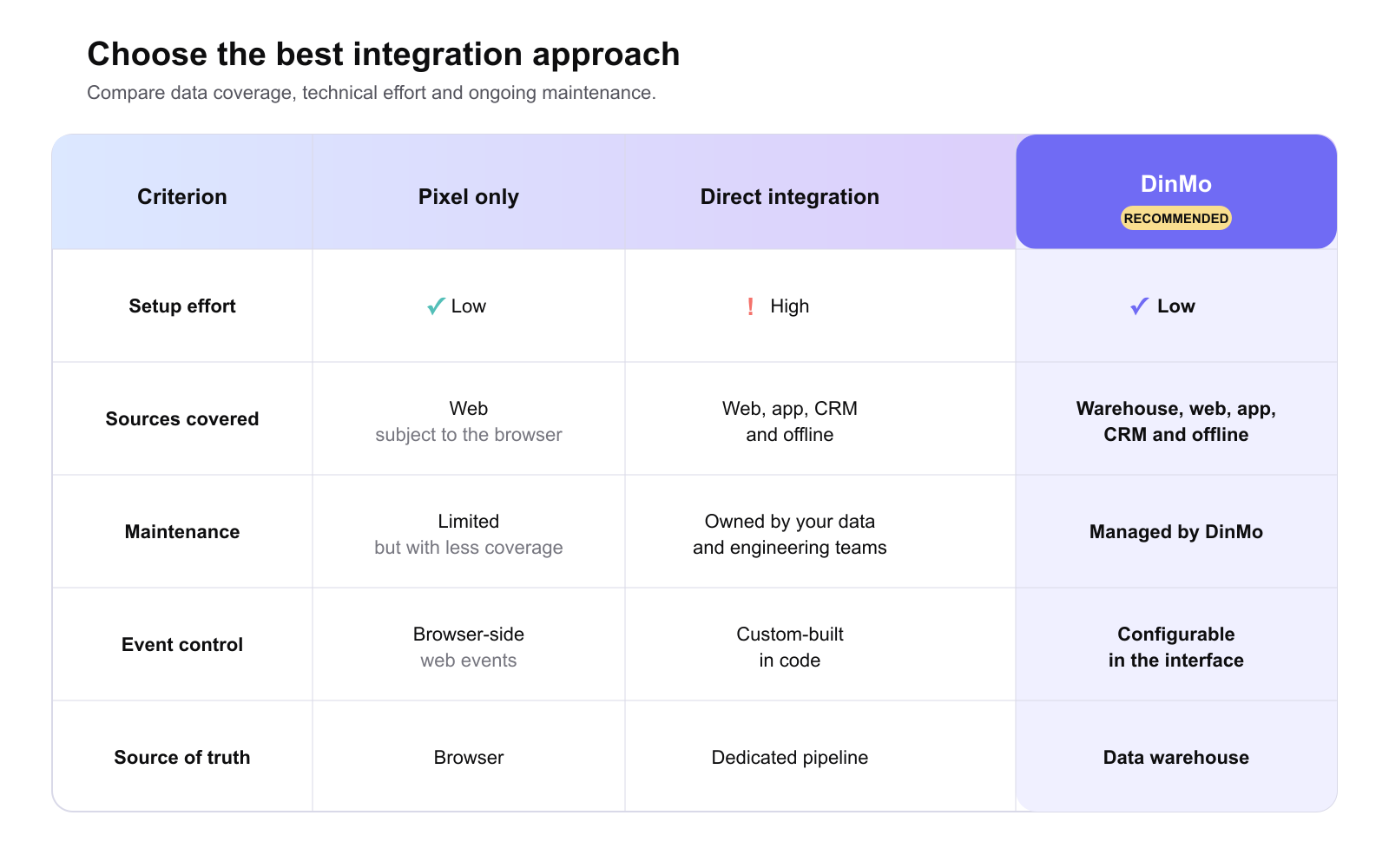
ChatGPT Ads integration options compared
3️⃣ Activate priority events
In DinMo, you select the data that represents a business event (such as an order, appointment or subscription) and activate it to ChatGPT Ads. Start with one or two lower-funnel events, confirm that they reflect commercial reality, then expand your coverage.
DinMo prepares and delivers the events to the platform. For connection prerequisites, field-level details and step-by-step configuration, see the ChatGPT Ads connector documentation.
4️⃣ Optimise campaigns around value
Once conversions are activated, the goal is to align advertising indicators more closely with the value the business actually creates. Teams can move beyond a view centred on clicks or cost per lead and measure outcomes that sit nearer to revenue.
Ecommerce: optimise around completed orders and their value rather than product visits alone.
B2B: distinguish submitted forms from appointments or genuinely qualified leads.
SaaS and subscriptions: track trials started and subscriptions actually created.
This approach supports fast learning: begin with a clear scope, compare delivered volumes with observed outcomes, then add new signals once their definition and quality are under control.
Success is not measured by the number of events configured. It is measured by whether teams understand what each signal means, can connect it to a commercial objective and use it to guide investment decisions. A simple strategy that is shared across teams and reviewed regularly creates more value than an exhaustive tracking plan that nobody actively uses.
Best practices for a sustainable strategy
Align every event with a campaign objective. A useful signal should support a clear marketing decision.
Prioritise lower-funnel events. They are less frequent, but usually represent business value more accurately.
Keep definitions stable. Marketing, sales, product and data teams should share the same understanding of a lead, order or subscription.
Apply consent and governance rules. Activate only the data you are authorised to use for advertising measurement.
Improve coverage progressively. A simple, well-controlled activation is more useful than a large set of events that teams struggle to interpret.
Why choose DinMo for ChatGPT Ads?
DinMo lets marketing and data teams work from the same source of truth. Events remain defined in the warehouse, their activation is visible and controllable, and the organisation avoids maintaining a different pipeline for every advertising platform.
You can apply the same approach to ChatGPT Ads and other destinations. The aim is not to send more data, but to give platforms the signals that best represent the value created by your campaigns.
FAQ
Is the ChatGPT Ads connector available to every DinMo customer?
Is the ChatGPT Ads connector available to every DinMo customer?
The connector is currently available in beta. Contact your DinMo representative to confirm that it is enabled in your environment.
Can I send offline conversions?
Can I send offline conversions?
Yes. An activation can use offline, physical_store, phone_call, email or other as its action source, provided the selected Event Setting and source data are configured correctly.
Does DinMo create events in ChatGPT Ads Manager?
Does DinMo create events in ChatGPT Ads Manager?
No. Create or reactivate the Event Setting in ChatGPT Ads Manager and link it to the pixel. DinMo loads active settings and lets you select one in the activation.
How much historical conversion data can I send?
How much historical conversion data can I send?
The event time must be within the last seven days and no more than ten minutes in the future. Filter an initial activation so every row fits this window.
Are personal identifiers sent in clear text?
Are personal identifiers sent in clear text?
DinMo normalises and SHA-256 hashes raw email addresses, phone numbers, external IDs, first names and last names. Prepare all other fields under your consent and data-governance requirements.
Ready to prepare your first ChatGPT Ads activation? Contact the DinMo team to review your event model and mapping.