

Customer journey builder: build and manage customer journeys
8min • Last updated on Sep 24, 2026


Alexandra Augusti
Chief of Staff
One customer has just made a purchase, another is waiting for a support response and a third has been inactive for months. Sending them all the same sequence would be easy to set up, but far from relevant to their needs. A customer journey builder helps you design journeys around each customer’s situation, actions and progress.
It turns your campaign orchestration strategy into steps: enrol an audience, wait, assess a condition, activate a destination and end the journey when its objective is reached.
These capabilities can sit within a marketing automation platform or a CDP with a journey orchestration engine. This guide explains how they work, where to build your journeys and what to check before putting them into operation.
Key takeaways
A customer journey builder coordinates actions over time through entry conditions, waits, branches and exits.
Marketing automation may be sufficient when the necessary customer data and channels are already available there. A CDP with orchestration capabilities is useful when you need to make journey decisions from customer data and activate several destinations.
Compare entry and exit rules, timing, destination actions and the tools available to monitor results.
Start with a clear objective, establish which data is available and test exceptions before launching.
What does a customer journey builder do?
A customer journey builder is a visual tool for defining a sequence of customer actions and conditions. Connected blocks typically represent audience entry, a waiting period, a decision, destination activation and the end of a journey.
Its value lies in managing progression. People in the same segment may be at different points: one has just entered, another is waiting for a response and a third has already completed the objective.
A customer journey map describes interactions and needs across the customer experience. A journey builder puts part of that experience into operation. A regular audience sync may be sufficient when you only need to keep a list updated in a marketing platform.
Journey Builder is also the name of specific products, including Salesforce's. Here, the term refers to the broader category: software for building and managing customer journeys, regardless of vendor.
Turn customer touchpoints into executable activities
Before configuring a journey, you need to start with the customer experience you want to create. Which touchpoints matter: a website visit, a purchase, a welcome email or a conversation with customer service? For each interaction, identify the objective, the data source and the action you can observe. Customer journey mapping helps clarify this plan before your team builds it in software.
Three examples make the requirements more concrete:
Welcome new customers. After a first purchase, send useful information about the product or your brand, then adapt subsequent content to product use. Personalised messages should help customers get value from the brand rather than promote products they have just bought.

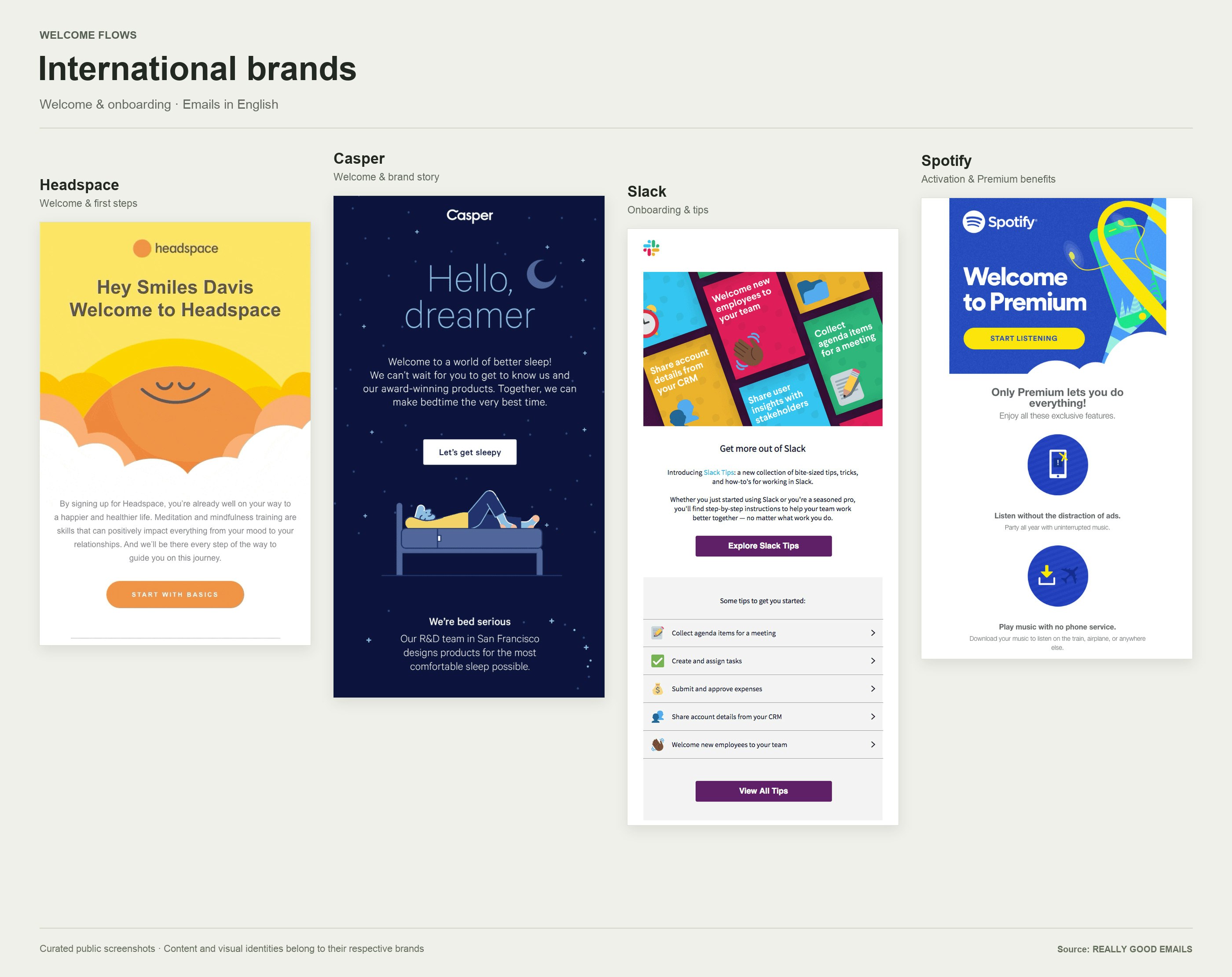
Welcome and onboarding email examples from Headspace, Casper, Slack and Spotify. Source: Really Good Emails.
Support a purchase decision. A contact views several products on your website. If those interactions are available and suitable for your marketing rules, they can inform a relevant follow-up. An anonymous website visitor does not automatically become someone you can email.
Prepare for renewal. Combine the renewal date, recent engagement and customer service information. The next activity might be a task for the sales team instead of another email to the customer.
These journeys serve different purposes and require different capabilities. Map the intended experience, list the messages and other activities each channel must deliver, and define when they should stop. This gives marketing, sales and service teams a shared plan for evaluating the software.
How can you prepare your first scenario in five steps?
Start by describing the journey you want to offer before choosing the software. Marketing, data and content specialists need a shared description of the planned activities to turn an idea into an experience that makes sense to customers. Use these five steps to prepare the first version.
1. Define the outcome and the people it serves
Decide what success looks like: helping new users discover a service, bringing inactive customers back or supporting product adoption. Write down the evidence of success and the circumstances in which communications should stop. These decisions give the team a clear basis for building and reviewing the workflow.
For a welcome programme, distinguish people who have created an account from those already using the service. They need different content. The best starting point is a small, clearly defined group whose experience you can examine before expanding the programme.
2. Map the sources behind each decision
List the systems involved: a CRM for contacts, an order system for purchases, a website or application for usage signals and an email platform for available engagement information. Record each field, its identifier, its owner and its refresh schedule.
Customer journey maps can help the team connect these sources to the intended experience. The maps should show which information is available at each touchpoint, rather than assume every website visit can be linked to a known person. Check several fictional profiles to establish that the systems describe the same people. Conflicting sources must be resolved before launch, not halfway through a campaign.
3. Create content that helps customers take the next step
Specify the activity behind each block: adding contacts to a list, updating information or requesting a message. Assign an owner and a destination. Then prepare the email subject, message, link and destination page together.
Prepare the personalised content: subject line, copy, link and landing page. A brand’s welcome email might help new users complete one useful task. Its next message should reflect what they have already done. For example, an email asking people to download a guide should lead to a working page on the website; a later message can offer relevant help if a usable response signal is available.
Check the wider brand experience too. An email, a product page and a service conversation should tell a consistent story. Brands that operate across several channels need clear ownership of tone, offers and contact frequency. Software can coordinate the sequence, but the team still needs to create content worth receiving.
4. Walk through every path
Review the scenario from the customer’s perspective. What happens to someone who responds immediately? What does the experience look like without a response? Every branch should reach an understandable outcome, including when information is missing.
Use the customer journey maps as a review aid, then check the executable rules separately. A map explains the intended experience; it does not prove that the software can deliver it. Include active campaigns in the review so that one team’s helpful reminder does not duplicate another team’s message.
5. Learn from the first version
After launch, examine the dashboard alongside individual cases. A missing field, a destination error and an unhelpful email require different fixes. Look at whether customers reach the intended next step, rather than assuming more messages mean better engagement.
Keep a record of each version: what changed, why and which measure should respond. Where practical, change one element at a time to make the results easier to interpret. The aim is to improve the customer experience through evidence while keeping the brand’s communications consistent.

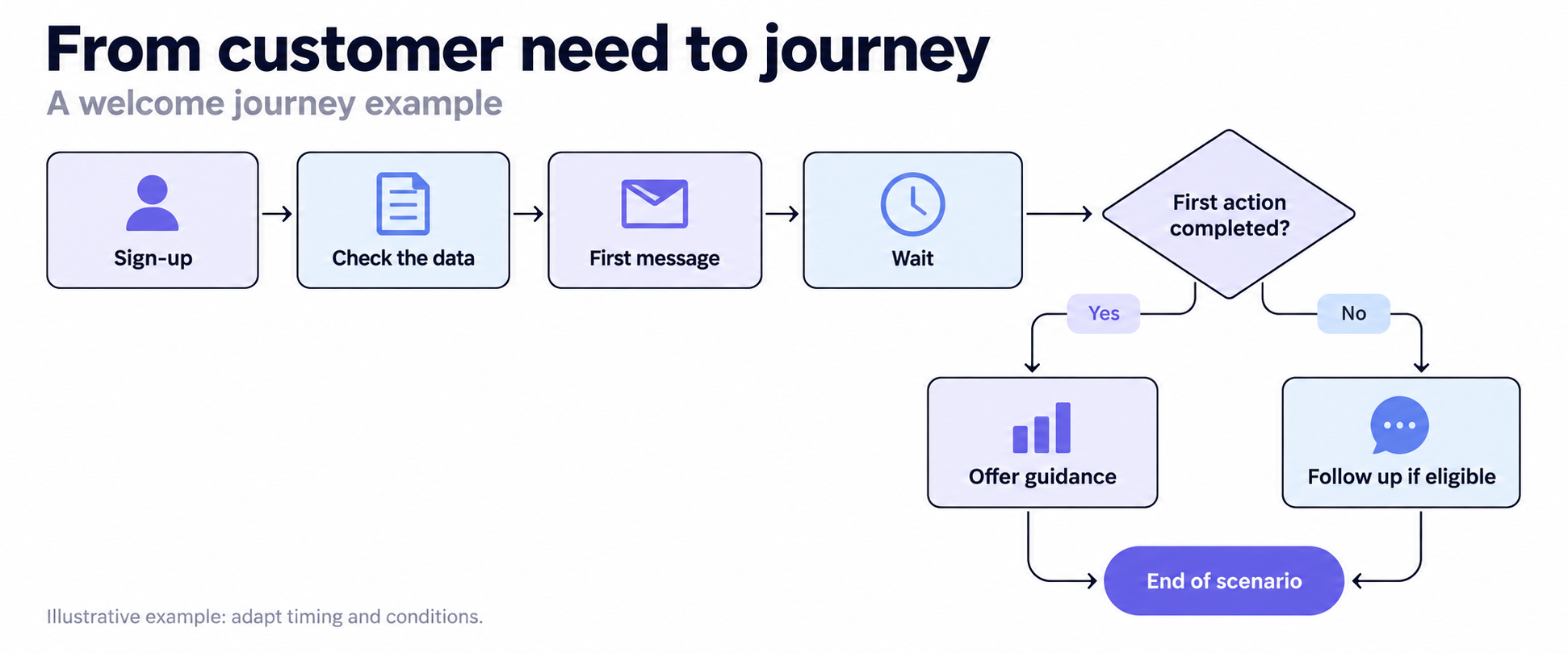
An illustrative welcome sequence.
Where should you build journeys: a CDP or a customer engagement platform?
A customer engagement platform (CEP) typically brings together communication orchestration, content personalisation and delivery across several channels.
Choose the place that can access the data needed for decisions and coordinate the intended actions. The software category alone does not settle the question: not every CDP includes a journey builder, and marketing automation platforms differ in their ability to integrate with external tools.
If your organisation uses a data warehouse, the requirements for data activation remain important: usable identifiers, fields that support the rules and a refresh schedule suited to the business need.
To decide, map one real journey with marketing and data colleagues. Identify where decisions happen, where messages are sent and how outcomes feed back into the process. Avoid spreading the same business rule across several tools without clear ownership.
Criterion | In a CDP with journey orchestration | In a customer engagement platform (CEP) |
|---|---|---|
Starting point | Customer data available in the CDP to define audiences and journey rules. | Profile and interaction data available in the platform, enriched through its integrations. |
Journey design | Define entry, waits, branches, exits and activations towards connected tools. | Define triggers, conditions and communication sequences across supported channels. |
Message creation and delivery | Destination tools handle message content and delivery. | The platform typically combines journey design, content personalisation and message delivery. |
Scope of coordination | Multiple destinations, including engagement tools, advertising platforms and other connected applications. | The platform’s channels, extended through available integrations and external actions. |
Best suited when… | You want shared journey logic based on customer data while retaining several execution tools. | You want to design journeys and deliver communications within one environment. |
Seven criteria for choosing a customer journey builder
1. The types of data you can use in journey rules
Ask the vendor to build a condition using the fields your team needs: latest order, subscription status, channel preference or an open support ticket. A connector listed in a catalogue does not prove that every field can be used at every step.
Check how tables are connected and how missing values are handled. If the last purchase date is unknown, is the profile excluded, routed down a default branch or kept waiting? The campaign owner should be able to understand the answer without interpreting a technical log.
2. Controlled entry and re-entry
A journey may accept a single cohort or admit newly eligible profiles over time. This choice is separate from how often the journey runs.
Next, examine re-entry rules. Can someone start again after completing the journey? How long must they wait? Is there a maximum number of entries? Remaining eligible should not accidentally trigger a repeated series of reminders.
Request a demonstration with one profile that stays in the audience after leaving the journey and another that leaves the audience before returning. The results should match your business policy, rather than an undocumented default.
3. Explicit timing
Waiting two days is different from waiting until a purchase occurs. For each step, check when the timer starts, which time zone applies, the maximum waiting period and what happens if the condition never becomes true.
Also distinguish when an event happens, when it becomes available in the data and when the journey processes it. A purchase recorded at 10:05 cannot change a decision at 10:06 if the journey only evaluates profiles again at 11:00.
The required speed depends on the use case. A weekly loyalty programme and an abandonment reminder may need different processing schedules. Ask for an end-to-end explanation of delays rather than relying on a broad claim of real-time operation.

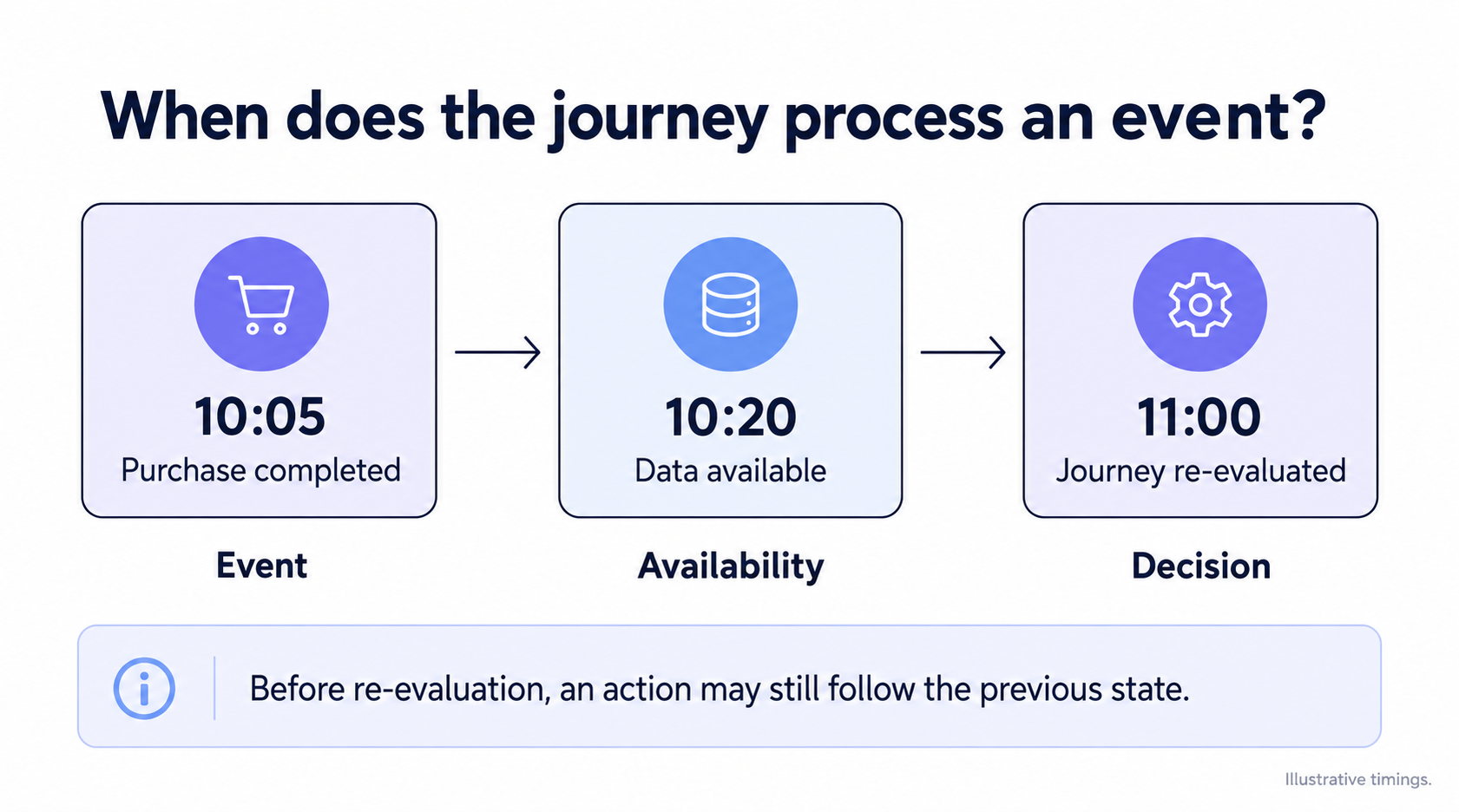
Three distinct moments.
4. Exits and suppression you can verify
Define the changes that make an action unnecessary or inappropriate: a completed purchase, a new customer status, consent that no longer supports the channel or an unresolved service issue.
Establish whether exit rules apply across the whole journey or only within a branch. Check when they are evaluated and which actions may already have been sent. Leaving a journey does not necessarily cancel a message that a destination has already accepted.
For an omnichannel strategy, also identify where journey conflicts and contact pressure are managed. A frequency cap in an email platform does not automatically account for communications on other channels.
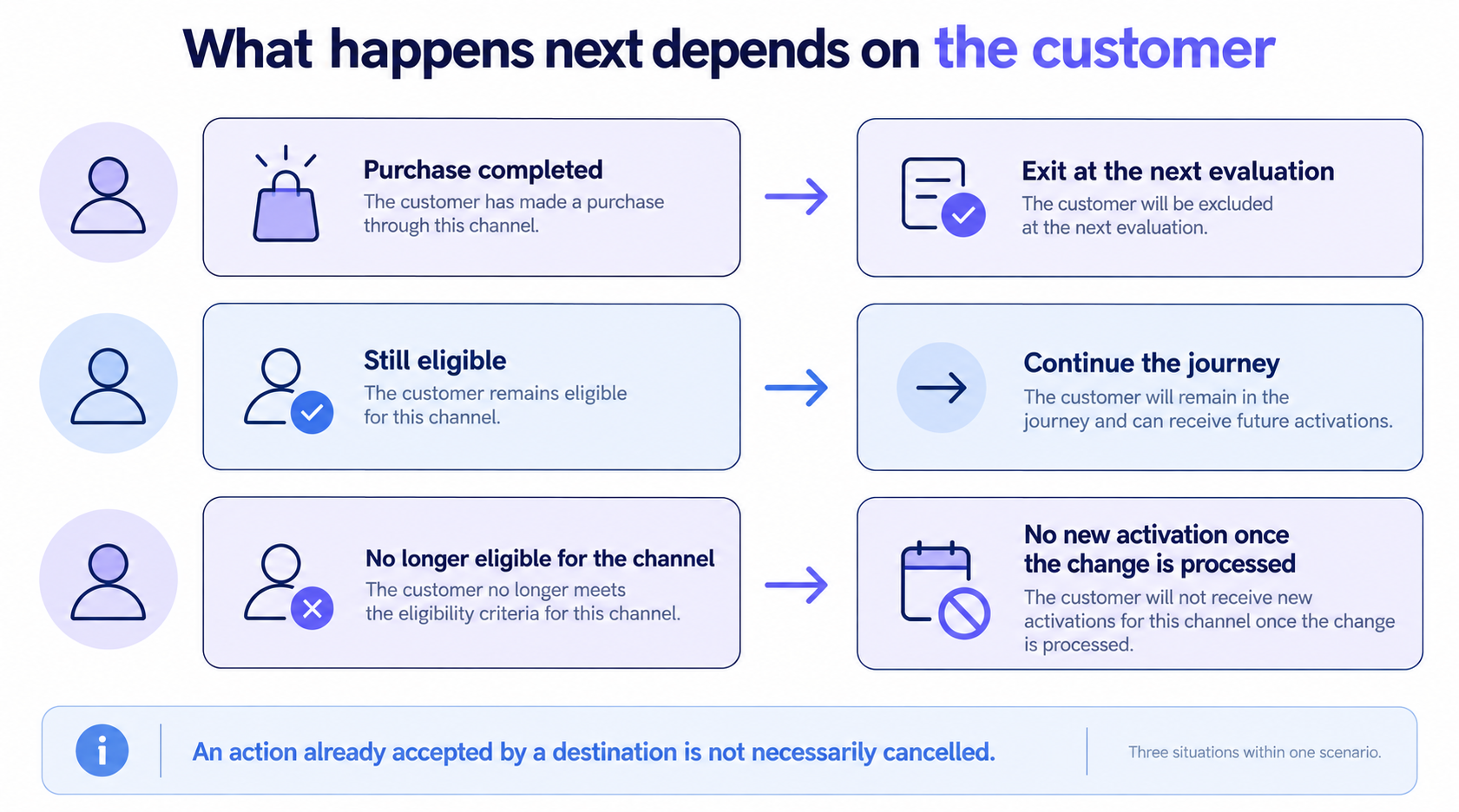
Three possible outcomes.
5. Observable destination actions
Identify exactly what each destination action does: add a profile to an audience, update an attribute, trigger a workflow or request a message. These operations have different consequences.
Test a missing identifier and a temporary destination error. Does the profile remain blocked? Will the operation be retried? How are duplicates prevented? Your team should be able to distinguish a completed step, an accepted request and a delivered communication.
This is particularly useful when personalised experiences depend on several connected platforms. A successful handover from one system does not, by itself, establish that the customer received the intended experience.
6. Practical operational control
Ask to see creation and publishing permissions, pre-launch validation and the behaviour of versions that are already running.
Pausing deserves its own test. What happens to profiles that are waiting? Does resuming preserve their position? How are waiting periods that elapsed during the interruption handled? Do not assume that a pause button withdraws actions already passed to other platforms.
These controls make a difference to day-to-day ownership. The person responsible for a campaign needs a clear way to investigate unexpected behaviour, prevent further actions where possible and resume safely once the issue is resolved.
7. Measurement and costs that fit the use case
Your team needs to understand entry volumes, profiles at each step, exits and errors. Connect that operational view to the business objective, such as repeat purchase, renewal or service activation.
An observed conversion rate alone does not establish a causal effect. If you need to measure incrementality, check how a holdout group can be organised and how the necessary analysis data will be retained.
Finally, compare total operating costs: subscription, profile or event volumes, destinations, warehouse processing and maintenance time. A monthly platform price may not reveal the cost of running journeys more frequently.
Ask to see a dashboard that separates journey activity, message performance and commercial results. An email open rate tells a different story from a repeat purchase rate. Define which customers enter each calculation, the measurement period and the data source behind it.
For a brand with several journeys, also check whether the same sale appears in multiple reports. Better visibility should help the team explain the customer experience across channels, not simply add up attributed sales. Compare reporting tools using the same sample customers and known outcomes.
Test your customer journey builder with a practical scenario
Prepare a fictional reactivation journey. Customers who have not purchased for 90 days enter, receive an initial communication and may qualify for a second action after two days, depending on their current situation. These timings are test assumptions, not universal recommendations.
The scenario follows a lifecycle marketing approach: adapting the action to the customer relationship. Keep it deliberately small when evaluating the software. What matters is whether the exceptions are handled correctly.
Fictional profile | Test situation | Evidence to request |
|---|---|---|
Alice | Purchases while waiting | Exit at the documented evaluation point, with processing delay and previously dispatched actions visible |
Bilal | Becomes ineligible for the channel before the second action | No further activation on that channel once the change has been processed |
Chloe | Remains eligible after finishing | Re-entry follows the configured delay and entry limit |
David | Lacks the destination's required identifier | A visible error or exclusion, rather than a misleading success |
Emma | Is waiting when the journey is paused | Position is preserved, or alternative resumption behaviour is explicitly documented |
Write the expected results with your data team and CRM owner before the demonstration. Use test destinations so that the evaluation does not send real customer communications.
Record each requirement as demonstrated, available through configuration, dependent on another tool or unavailable. An unsupported sales answer remains “to verify”. Keep essential requirements as pass-or-fail gates: excellent usability cannot compensate for exit behaviour that does not fit your use case.
How DinMo can help you build customer journeys
Journeys in DinMo Customer Hub let you create and manage multi-step customer journeys. Each profile retains its position between runs, allowing you to coordinate successive actions beyond a standalone audience sync.
From audience entry to activation
The visual builder provides six types of step:
Start defines which profiles can enter, from an audience or an event, together with re-entry rules.
Wait holds profiles for a duration or until a specified weekday and time.
Segment routes profiles along different paths according to the value of a field.
Pause Until waits for a profile condition or event, up to the configured maximum duration.
Activate sends profiles to one or more configured destinations.
Stop ends the path for the profile.

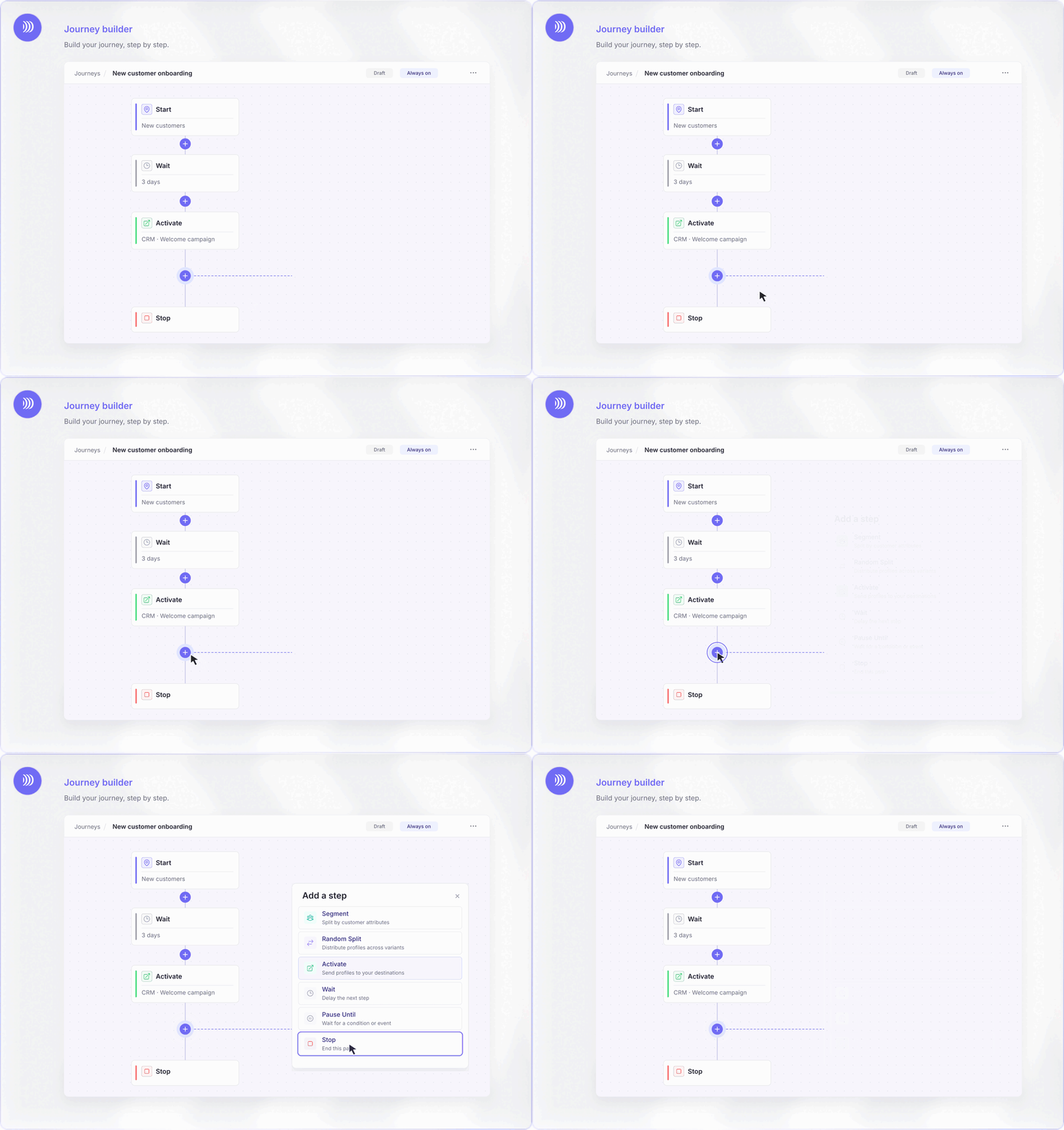
Building a customer journey in DinMo — animation from the Journeys product page.
Control entry and re-entry
The Start step lets you choose an audience or an event as the entry point. A minimum re-entry delay and a maximum entry count help prevent repeated reminders. Exit rules let you remove profiles when their situation no longer fits the scenario.

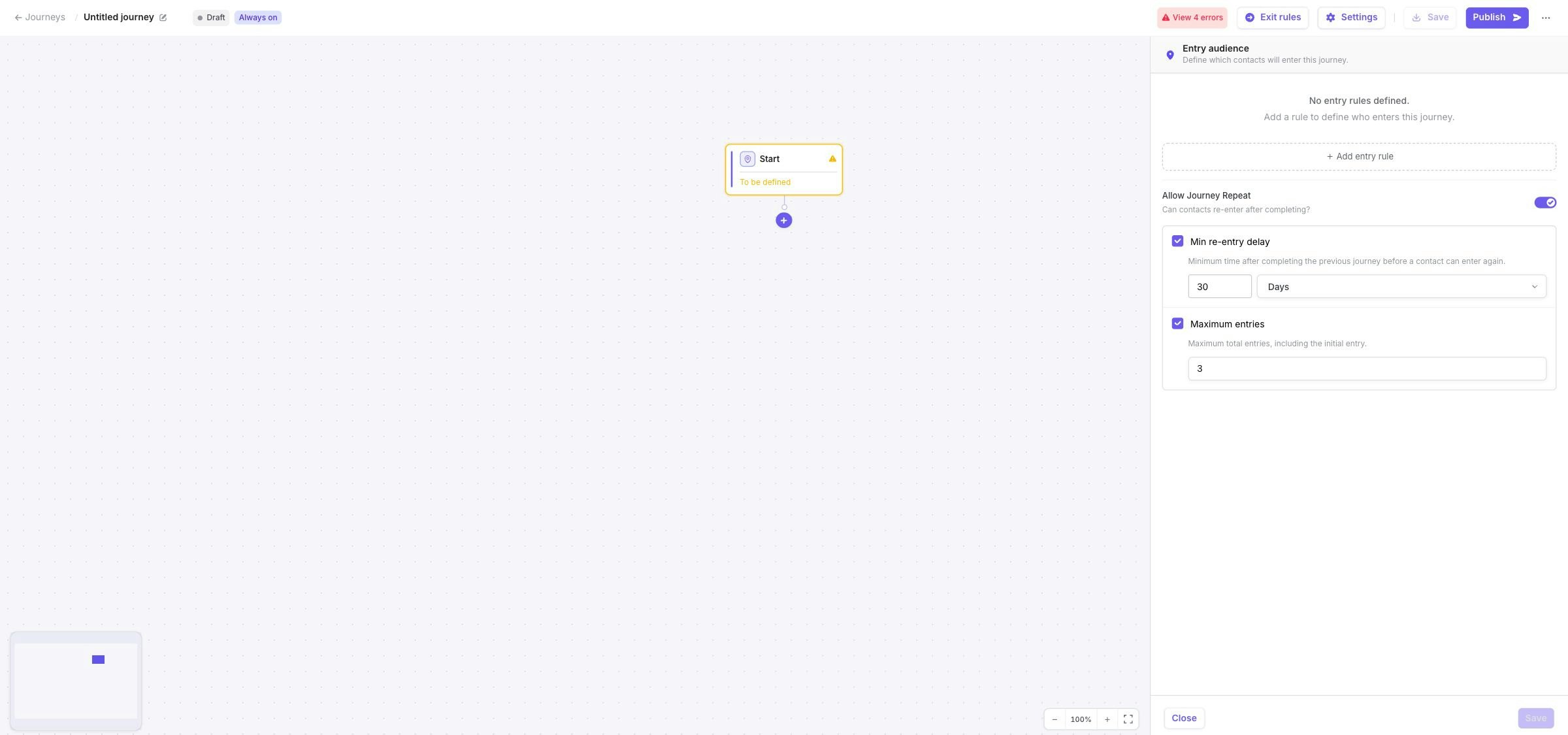
An example of re-entry settings in DinMo.
Stay in control as the journey runs
Exit rules apply to the entire Journey, regardless of a profile’s current position.
Journeys are evaluated during scheduled or manually triggered runs. Rules are not continuously re-evaluated between runs, so the processing schedule must reflect how quickly a purchase or profile change needs to affect the journey.
You can prepare a Journey as a draft, publish it and pause execution. Profiles retain their position while paused. The displayed activity reflects the latest successful run. These controls help the team understand progression and check the journey’s behaviour before extending its use.
Monitor how profiles progress
The Activity tab shows profiles that entered, are present, advanced or exited at each step, reflecting the latest successful run. Check message delivery and commercial outcomes in the relevant tools.
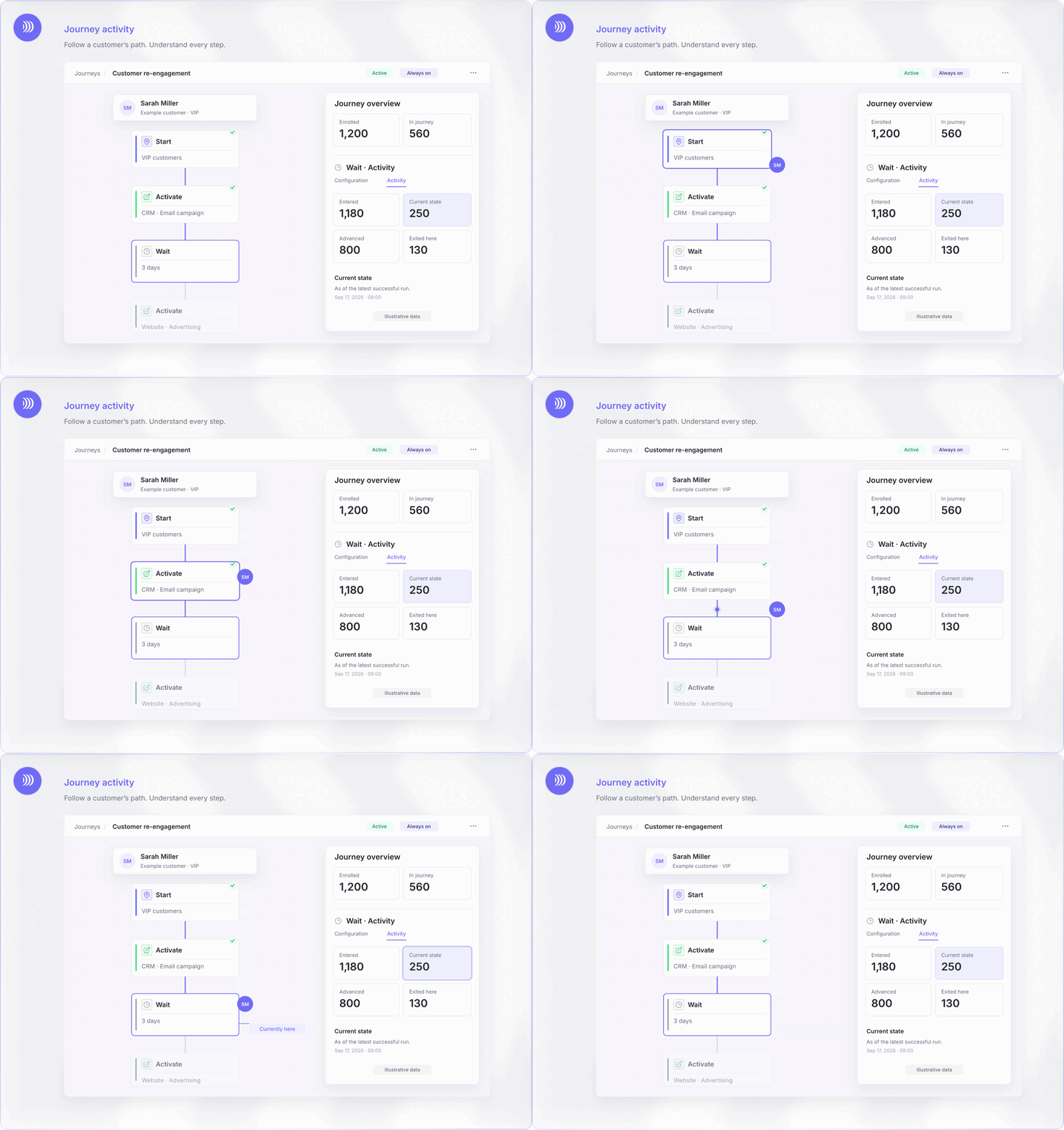
Monitoring journey activity in DinMo — animation from the Journeys product page.
Turn your scenario into a working customer journey
A customer journey builder turns marketing rules into a workflow your team can monitor and develop. The choice depends on the required data, destination actions and operational controls, whether orchestration sits in a CDP or a marketing automation platform.
With DinMo, you can build these journeys in Customer Hub, define how profiles progress and activate destinations at the relevant steps. Start with a clear objective, an audience and a few exit conditions. Test exceptions and adjust the processing schedule before launch.